

Last updated on June 3rd, 2026 at 04:36 pm

This article is a nine-page comprehensive RV essentials guide.
If you have arrived in the middle of the guide but want to start at the beginning, click here.
RV Internet Necessities for Those Working From an RV
These days, more and more people are working from RVs.
Let’s set you up with everything you need to make a respectable workspace.
Obtaining Internet on the Road
If you plan to work while traveling or live in your RV, as we did, you may wonder what to use for the internet.
It’s a good question!
It would be best not to depend on RV parks or campgrounds for quality internet. Finding that is rare.
That said, you have options to get yourself up and running on the road.
Here are a few popular options:
Using Your Cell Phone or Tablet
One option for getting internet on the road is using your cell phone or tablet’s data plan.
If using data via a hotspot is part of your cellular plan, you can get the internet up and running on your laptop using your phone or tablet’s hotspot feature.
However, while this can work for essential work functions, I wouldn’t consider it a full-time option. Generally, those plans come with a data cap. Once you reach the limit set by your mobile carrier for your hotspot, speeds will be reduced for the rest of your billing cycle.
Using a Mobile Hot Spot
A better option than the one above is to get internet via a mobile hotspot, often called Jetpacks or MiFi devices.
They function similarly to your phone’s hotspot feature (with a data plan) but run off a separate portable device.
Mobile hotspots are a popular, portable internet option for RVers, but how helpful they are depends entirely on the data plan you have working within them.
We have successfully operated with a combo of the two options above.
We primarily function off a MiFi device connected to a Verizon plan, but have a backup of two phones on an AT&T cellular plan with a limited hotspot. So, if we’re ever in a spot where one carrier doesn’t service, usually the other pulls through.
Between those two options, we could almost always find the internet service we needed.
Using a Cellular Router with a Modem
We personally never needed to level up to a cellular router and modem setup on the road. But we know other RVers who have gone about it via this approach.
These setups will give you the most extensive range of data connection options and be the most reliable.
I recommend starting with the above hotspot combination and seeing if you need to level up to this.
Looking to obtain reliable mobile internet for remote work while traveling?
🛜 Click here to read the review of RoamLink for the full-time RVer! 🛜
Using Starlink
I have heard hit-and-miss rumblings about Starlink Roam. For the moment, I recommend the options above.
That said, with time, that will likely change.
Cell Signal Booster
A signal booster, such as the WeBoost, amplifies your cellular signal, expanding your ability to go further off-grid!
The WeBoost Signal Booster uses an antenna you install on top of your RV to amplify the existing cell signal you’re receiving from the nearest cell tower, giving you a stronger connection.
Before having the weBoost Signal Booster, we felt we lost some freedom and sometimes had to stay closer to bigger cities with better signal to get jobs done on time. But once installed, it noticeably improved our cellular signal situation.
While boosters rarely improve download speeds, they help increase your upload performance when you’re far from cellular towers.
For example, I’ve now been able to video conference, send large photo or video files, and upload podcast episodes while boondocking in Grasslands in North Dakota.
We rarely feel disconnected between our AT&T phones, our Verizon hotspot, and the weBoost Signal Booster.
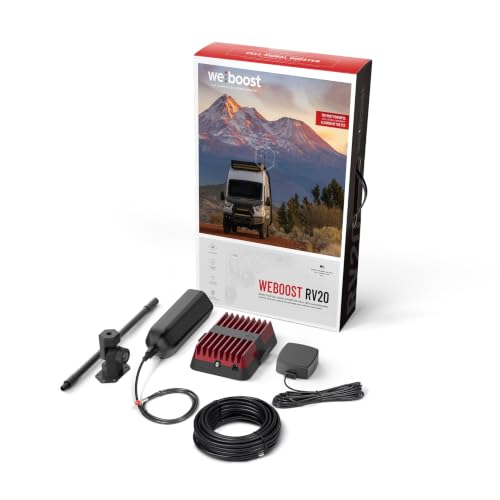
- Durable outside antenna | Enhances signal reach up to 3X the distance from the nearest tower, reducing dropped calls by up to 90%.
MIMO Antenna
Rather than boosting your cellular signal, a MIMO antenna simply adds a stronger antenna to your hotspots or cellular routers.
This will help those looking to improve their download speeds, which is great for streaming, web browsing, and downloading files.
Most hotspots and cellular routers have antenna ports, and a MIMO antenna is an affordable way to improve the signal going into your device.

- Compatible with NETGEAR Mobile Hotspot Routers M5 (MR5200) and M6 (MR6150 & MR6550)

Bluetooth Noise Canceling Headphones
If you’re traveling or living with anyone else in an RV, Bluetooth and noise-canceling headphones are a must.
That’s because odds are, there will be moments when you all want to listen to different things.
You’ll want a pair that can connect via Bluetooth since wires can quickly make a trippable mess in an RV.
And then you’ll also want noise-canceling since you’re rarely far from your traveling companion. The space is small, after all.
I personally love Airpods!
Apple AirPods Pro Wireless Ear Buds

- WORLD’S BEST IN-EAR ACTIVE NOISE CANCELLATION — Removes up to 2x more unwanted noise than AirPods Pro 2* so you can stay fully immersed in the moment.*
My husband likes headphones that fit completely over his ears.
If you’re in that boat, these headphones are a great option at a mid-range price point.
They are noise-canceling, last 70 hours before needing to be recharged, and the listener can be up to 33 feet away from their Bluetooth connection.
Noise Canceling Over Ear Headphones
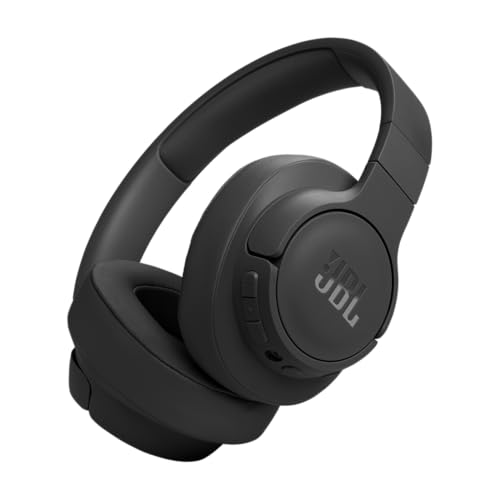
- Adaptive Noise Cancelling with Smart Ambient: Adaptive Noise Cancelling means zero distractions whether you’re studying or getting lost in the music. If you want to hear the world around you, activate Ambient Aware and TalkThru in the JBL Headphones app.
RV Boondocking Essentials
While boondocking is a much bigger topic, and there are tons of items to help you function best “off-grid,” here are two items we found considerably helpful (in addition to the already mentioned generator, water jug, etc…):
Solar Generators & Portable Power Stations
There are countless ways a Portable Power Station can come in handy. Essentially, they’re great for running some of the appliances you desire while off-grid camping.
We have really fallen in love with our Jackery battery-powered inverter generator portable power station, which can charge via AC, USB, and DC.
When the power station is out of juice, it can be recharged from a car, wall outlet, or solar panels.
If you reboot your power station with solar panels, you’re set with a portable renewable power option you can take anywhere! Having one of these portable charging stations, combined with the solar panels to recharge it, has helped us level up our boondocking game.
And the newest models feature faster solar recharging times, improved battery management, and smart app integration for remote monitoring.
Different models can power different appliances depending on your needs. Jackery sells units from very small, low-capacity models (~300 Wh capacity and ~300 W output) to very large units (~5,000 Wh capacity and ~7,000 W output).
Note the difference: capacity is measured in watt-hours (Wh) (how much energy is stored), while output is measured in watts (W) (the speed at which the energy is used).

On Jackery’s website, you’ll see “Solar Generators” and “Portable Power Stations.” Here’s a quick breakdown of the difference:
☀️ Solar Generators: This is essentially a power station with solar recharging capability. The term “generator” here refers to its role as a backup or off-grid power source.
Jackery’s solar generator models are a subset of their power-station line that emphasizes solar use. They are optimized for charging from solar panels, making them a great choice for boondocking or emergency backup power.

- Powerful yet Compact: Boasting a 1,500W AC output and a 3,000W surge peak, the Solar Generator 1000 V2 can power multiple appliances, including AC units, fridges, and electric pots. With a 1,070Wh capacity and a lightweight build of only 23.8 lbs, along with a foldable handle, it makes an excellent companion for outdoor camping, road trips, and emergencies.
🔋 Portable Power Stations: This is a battery-powered device. While many can accept solar input, they are also commonly recharged via wall outlets or car chargers.

- Powerful yet Compact: Boasting a 1,500W AC output and a 3,000W surge peak, the Solar Generator 1000 V2 can power multiple appliances, including AC units, fridges, and electric pots. With a 1,070Wh capacity and a lightweight build of only 23.8 lbs, along with a foldable handle, it makes an excellent companion for outdoor camping, road trips, or emergencies.
Beyond boondockers, RV lifers, and campers, these devices are also fantastic for outdoor events, for anyone looking for an emergency backup power source, or for anyone who works outdoors.
Solar Panels
Solar panels provide a sustainable energy source when you’re not hooked up to shore power, charging your battery so it can run your 12-volt systems, such as lights, fans, and water pumps.
Panels can be roof-mounted on your RV or freestanding; mounted panels are more convenient and space-saving, while freestanding panels are more energy-efficient because you can reposition them to track the sun.
Panels come in a range of sizes and maximum wattages. The more panels and batteries you have, the more you can power.
Renogy 2 Piece 100 Watt 12 Volt Solar Panel
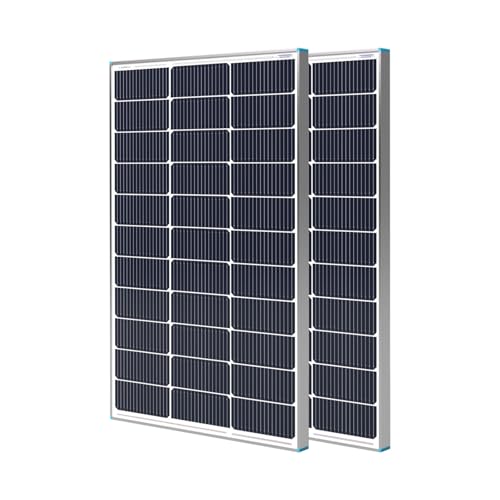
- 𝗠𝗮𝗿𝗸𝗲𝘁-𝗟𝗲𝗮𝗱𝗶𝗻𝗴 𝟮𝟱% 𝗖𝗼𝗻𝘃𝗲𝐫𝘀𝗶𝗼𝗻 𝗘𝗳𝗳𝗶𝗰𝗶𝗲𝗻𝗰𝘆 – Renogy’s 100w solar panel features A+ grade n-type solar cells, achieving an impressive 25% conversion efficiency. This slolar panel delivers 20W more power output compared to standard solar panels 100 watt of the same design, making it an excellent choice for solar energy solutions.
When deciding on solar panels, you need to consider which appliances you want them to power, what you expect your appliance usage to be, and how many batteries you’ll need to harness and store the incoming solar energy.
Here are a few examples of how many watts appliances use:
💡 A 40-inch television uses somewhere between 50 and 200 watts every hour, depending on the type of TV.
💡 Energy-efficient LED lights will use approximately 10 watts per hour.
Continue Reading:
PAGE ONE: Top Ten RV Must-Haves
PAGE TWO: RV Water & Sewer Supplies
PAGE THREE: Road Trip Planning Tools
PAGE FOUR: Fundamentals for RV Emergencies, Safety, & Maintenance
PAGE FIVE: RV Kitchen Essentials
PAGE SIX: RV Bedroom, Closet, Laundry, Bathroom, & Living Room Essentials
PAGE SEVEN: RV Internet & Boondocking Essentials
PAGE EIGHT: Fun Outdoor Camping Items, Traveling with Bikes, & Traveling with Pets
PAGE NINE: Stationary RV Living, Winter RV Living, RV Storage, & FAQs
